
Businesses across the United States are managing more data, departments, customers, orders, employees, and financial processes than ever before. When these operations run through disconnected spreadsheets and separate applications, teams can lose time, duplicate work, and struggle to get a clear view of business performance. Custom ERP software can bring these processes together in one centralized system.
A Custom ERP Software Development Company in USA can help businesses build an ERP platform around their actual workflows instead of forcing employees to adjust their processes to fit a generic software package. From finance and inventory to sales, purchasing, HR, customer management, and reporting, a custom ERP system can connect important business functions within a single digital environment.
What Is Custom ERP Software Development?
Custom ERP software development involves creating an enterprise resource planning system based on the specific requirements of a business. Unlike off-the-shelf ERP platforms that offer predefined features, custom ERP solutions can be designed around existing workflows, business rules, user roles, reporting requirements, and integration needs.
For example, a manufacturing company may require production planning, inventory tracking, supplier management, purchase orders, and quality control. A distribution business may need warehouse management, order processing, logistics tracking, and customer account management.
The goal is to create one connected system where relevant teams can access accurate information without repeatedly transferring data between different applications.
Custom ERP development can also be useful when a business has outgrown its existing software. Instead of replacing every system at once, an ERP platform can be developed with the required modules and integrations based on business priorities.
Why Businesses Choose Custom ERP Solutions
Every organization has different processes. Two companies operating in the same industry may still have completely different approval workflows, reporting requirements, pricing structures, inventory models, or customer management processes.
Custom ERP software allows these differences to be reflected in the platform.
A business can choose which modules it needs, how users interact with the system, what information is displayed, and how different departments share data. This can make the software more relevant to daily operations.
Common benefits include:
- Centralized business information
- Automated repetitive processes
- Better communication between departments
- Real-time operational visibility
- Customized dashboards and reports
- Role-based user access
- Integration with existing business applications
- Improved data consistency
- Support for business-specific workflows
- Easier access to important operational data
For businesses looking for a broader technology solution, custom software development can also cover applications that work alongside or integrate with an ERP platform.
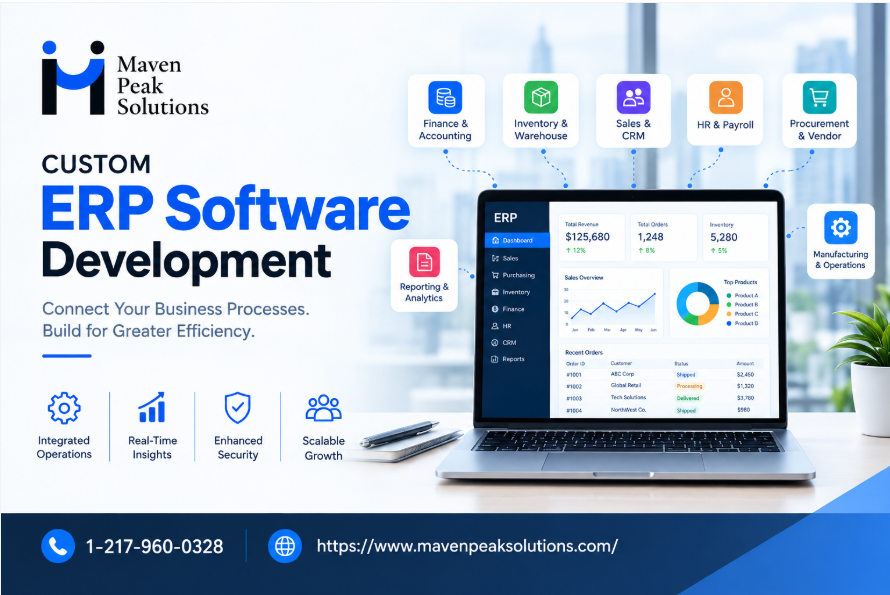
Key Modules in a Custom ERP System
A custom ERP platform can include different modules depending on the organization’s size, industry, and operational requirements.
Finance and Accounting
Financial management is one of the core areas of many ERP platforms. Businesses can use customized modules for invoices, expenses, payments, financial reporting, budgets, and account management.
Connecting financial data with sales, purchasing, and inventory can reduce the need for manual data entry and help teams work with more consistent information.
Inventory and Warehouse Management
Inventory management becomes difficult when stock information is maintained across spreadsheets or disconnected applications.
An ERP system can centralize inventory records, stock levels, purchase information, warehouse movements, product details, and order status. Businesses can also build alerts and reporting features around their specific inventory requirements.
Sales and Customer Management
Sales teams need access to customer details, orders, quotes, invoices, and communication history. Connecting these functions within an ERP platform can give teams a clearer view of customer activity.
Custom workflows can also automate activities such as order approvals, notifications, sales assignments, and follow-ups.
Human Resource Management
Businesses with larger teams may integrate employee records, attendance, payroll-related information, leave management, onboarding, and internal workflows into their ERP environment.
Access controls can ensure employees only see information relevant to their roles.
Procurement and Vendor Management
Procurement teams can manage suppliers, purchase requests, purchase orders, approvals, and vendor records from one platform.
Automated approval workflows can help reduce manual coordination and make purchasing processes easier to monitor.
Business Intelligence and Reporting
Data becomes more useful when decision-makers can understand it quickly. Custom dashboards can combine information from different ERP modules and display relevant business metrics.
Reports can be designed for executives, managers, finance teams, sales departments, operations teams, or other users based on their responsibilities.
ERP Integration With Existing Business Systems
Most established businesses already use multiple applications. These may include CRM platforms, accounting software, payment gateways, ecommerce platforms, shipping systems, marketing tools, HR applications, and third-party APIs.
A custom ERP solution can be developed to communicate with these systems.
For example, an ecommerce order could move into the ERP system automatically, update inventory, generate relevant financial information, and notify the appropriate operations team. This reduces repetitive manual work and keeps information synchronized between connected platforms.
Businesses that require a wider technology foundation can also consider software development services for building supporting applications, integrations, APIs, and business-specific digital tools.
Custom ERP Development for US Businesses
US businesses often operate across multiple locations, departments, vendors, and customer groups. As operations grow, managing information across disconnected systems can become increasingly difficult.
A custom ERP platform can be designed around the company’s organizational structure and operational requirements.
For example, a growing business may need separate permissions for administrators, finance teams, sales representatives, warehouse staff, managers, and executives. A customized ERP system can use role-based access to provide each user with the information and functions they need.
Businesses may also require specific reporting structures, approval processes, tax-related configurations, payment integrations, or connections with existing enterprise applications.
The exact requirements depend on the company’s industry and operational model, which is why a requirement analysis is an important part of ERP development.
How the Custom ERP Development Process Works
A structured development process helps ensure that the final ERP platform supports real business requirements.
1. Requirement Analysis
The development team reviews existing workflows, software, departments, user roles, pain points, integrations, and reporting requirements.
2. ERP Architecture and Planning
The system architecture is planned around the required modules, database structure, integrations, security requirements, and future expansion.
3. UI and UX Design
The interface is designed to make complex business information easier to access. Dashboards, forms, menus, reports, and workflows are created around different user roles.
4. Development
Developers build the required ERP modules and business logic. APIs and integrations can also be developed during this stage.
5. Testing
The system is tested for functionality, performance, security, integrations, user permissions, and workflow accuracy.
6. Deployment
Once testing is completed, the ERP platform can be deployed according to the business’s infrastructure and operational requirements.
7. Maintenance and Improvements
ERP systems often evolve as businesses grow. New modules, integrations, reports, automation features, and user requirements can be added over time.
Custom ERP vs. Off-the-Shelf ERP
Off-the-shelf ERP software can provide a broad collection of standard business features. However, it may not always match specialized workflows.
Custom ERP development provides greater control over functionality and system behavior. Businesses can build only the features they need and integrate them with existing applications.
The right approach depends on factors such as budget, business complexity, required customization, existing infrastructure, integration needs, and long-term plans.
For organizations with highly specific workflows, custom enterprise software can provide a way to build technology around their operations rather than changing established processes around a fixed product.
Security and Scalability in ERP Software
ERP platforms handle important business information, so security should be considered from the beginning of the development process.
Common security measures can include role-based permissions, authentication controls, encrypted data transmission, secure APIs, activity logging, and controlled access to sensitive information.
Scalability is another important consideration. An ERP system should be designed with future growth in mind. Additional users, locations, departments, products, transactions, and integrations may need to be supported as the business expands.
A properly planned architecture can make it easier to introduce new functionality without rebuilding the entire platform.
How to Choose an ERP Development Partner
When evaluating an ERP development company, businesses should look beyond a list of technologies. The development partner should understand business workflows, system integrations, data structures, security requirements, and long-term software maintenance.
Consider asking:
- Does the team understand your industry and workflow?
- Can they build custom modules?
- Can the ERP integrate with existing applications?
- How will user permissions be managed?
- What testing process will be followed?
- Can the system support future growth?
- What support is available after deployment?
- How will data migration be handled?
- Can the team develop custom dashboards and reports?
A clear development plan can help reduce unexpected changes during implementation.
Build an ERP Platform Around Your Business
ERP software should support the way your organization operates. Whether you need finance management, inventory control, sales workflows, procurement, HR functionality, reporting, or integrations, custom development provides the flexibility to build a system around your requirements.
Working with a Custom ERP Software Development Company in USA can help businesses plan and develop an ERP platform that connects core operations while leaving room for future growth.
For businesses that need additional applications, integrations, or specialized enterprise tools, custom software development can extend the capabilities of the ERP environment.
The most effective ERP project starts with a clear understanding of business processes. Once those requirements are defined, the right modules, integrations, automation features, and reporting tools can be selected to create a practical system that supports everyday operations and long-term business needs.